

7 years in QA. I've written hundreds of bug reports. Yesterday I closed two of them myself.
I'm a Senior QA Automation Engineer. Most of my days are spent designing automation frameworks, setting up CI/CD pipelines, and making sure nothing ships broken.
My job is to find bugs and hand them off to developers. That's always been the workflow.
Yesterday, I broke it.
I was testing a mobile app against the Figma designs. Two things immediately stood out:
- A banner component was in the wrong position — sitting at the top of the Settings screen instead of near the bottom, right above the Logout button
- A button had a weird bouncing animation every time the screen loaded — visually jumping up and down instead of staying static
Normally I'd open Jira, document both, assign them, and check back in a day or two.
Instead, I opened Claude Code in my terminal.
What happened next took less than 5 minutes.
Bug #1: The Banner in the Wrong Place
What I saw: A banner component was displaying at the top of the Settings screen — above everything else. In Figma, it clearly belonged near the bottom, just above the Logout button.
What I told Claude Code:
"The banner is showing at the top of the Settings screen but according to the Figma design it should be at the bottom, just above Logout."
No file paths. No component names. Just the visual description.
Claude Code navigated the codebase on its own — and understood the issue immediately. The Settings screen is built using an ordered array of components — each entry maps to a row on screen, top to bottom. The banner was registered as the first entry in that array, which is why it rendered at the top.
The fix was simple: move the banner entry from the top of the array to the bottom, right above Logout. No new logic, no new code — just the correct position.
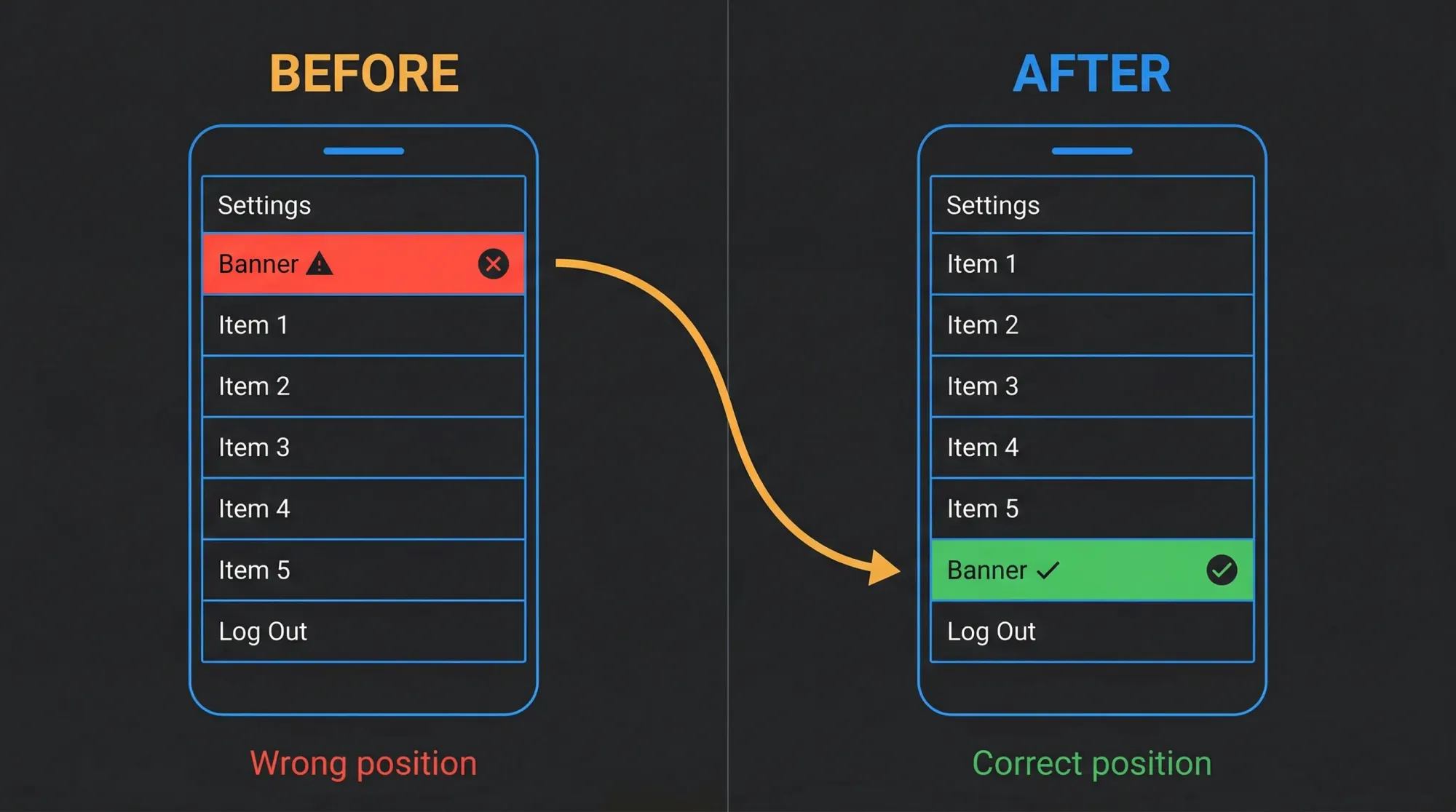
Root cause in one sentence: the component was registered in the wrong position in the ordered array that controls screen layout.
What impressed me wasn't the fix itself — it was that Claude Code understood how the screen was structured without me explaining it.
Bug #2: The Button That Wouldn't Stay Still
This one was more interesting.
What I saw: A button on one of the screens was bouncing — visibly jumping up and down every time the screen loaded or regained focus. Not a subtle flicker. A noticeable layout shift that made the UI feel broken.
What I told Claude Code:
"There's a button with an unintended bouncing animation. It should be completely static."

Claude Code traced the issue back to how the safe area was being handled in the screen template. The safe area context has two modes for applying safe area offsets: margin and padding.
The difference matters: - Margin mode applies the offset after the initial render — the layout calculates without that space, then gets pushed into position. This causes a visible jump when the screen mounts. - Padding mode (the default) reserves that space upfront at render time — no adjustment needed, no jump.
The template was using margin mode. Removing that single configuration value and falling back to the default fixed the bounce entirely.
Root cause in one sentence: the safe area offset was being applied after render instead of being reserved upfront, causing a visible layout shift on every screen mount.
One configuration value. Bouncing gone.
The Part I Didn't Expect
After the second fix, Claude Code ran the test suite and flagged that 4 snapshot tests had failed — because they contained the old configuration in their snapshots.
It then updated them automatically.
I didn't ask for this. I sat there for a second just staring at the terminal. It had already thought further ahead than I did.
It understood that changing a component's configuration would affect existing snapshots, ran the tests, found the failures, and resolved them.
That's the moment I realized this isn't just autocomplete. It's a tool that understands the full impact of a change — not just the code, but the tests that validate it. That means fewer broken builds, fewer late-night surprises after a merge.
What I'd Be Careful About
Both of these bugs were visual and isolated — a positioning issue in an array and a single configuration value. Claude Code handled them cleanly because the fix didn't require understanding business logic, user flows, or multi-system dependencies.
If the bug had been deeper — wrong state management, a race condition across async calls, something that touches multiple systems at once — I would not have approved a fix without a developer reviewing it first. That judgment call still belongs to a human.
Claude Code is fast and genuinely impressive. But knowing when not to trust it is just as important as knowing when to use it.
Why This Matters for QA Engineers
Think about the last bug you documented in Jira. How long did it sit there before someone picked it up?
A QA engineer who can close that bug in the same sprint it was found doesn't just save time — they change how the team perceives QA entirely.
That's what's shifting. Not the role. The ceiling.
I'm not saying QA should become dev. I'm saying the wall between them just got a door.
What's Next
I'm going to keep using Claude Code as part of my QA workflow and document what works, what doesn't, and where the real limits are — not where the marketing says they are.
Next post: how I set up CLAUDE.md for QA projects — the single file that gives Claude Code enough context to be genuinely useful on your specific codebase from day one.
If you want Claude Code workflows, real test automation examples, and honest takes on what actually works for QA engineers — subscribe below. 3× a month, no fluff.
Dusan Petrovic is a Senior QA Automation Engineer with 7 years of experience designing test architecture and building automation frameworks — Playwright, Cypress, Selenium, Appium, Detox, across web, mobile, and backend. He's built frameworks from scratch, set testing standards for teams, and integrated automation into CI/CD pipelines across multiple organizations. He writes about using Claude Code and AI tools to cut the manual work out of QA, based on workflows from real projects.