


Four files. Zero hand-holding. Here's exactly what's in them and why.
Claude Code out of the box writes mediocre tests. Not because it's bad at coding — because it doesn't know your standards. It guesses. And in QA, guessing is expensive.
I spent the first few weeks fighting it. I'd ask for a Playwright test, get something that looked reasonable, run it — and watch it fall apart. Wrong locators. No label assertions. No data stored for review page checks. Every session felt like onboarding a new junior engineer who forgot everything overnight.
Then I stopped trying to fix the output and started fixing the input.
The problem with vanilla Claude Code
When Claude Code has no context about your project, it fills the gaps with assumptions. For QA automation, those assumptions are almost always wrong:
- It writes tests without asking what they should verify
- It picks locators based on what looks stable, not what is stable
- It has no concept of your team's standards — no POM conventions, no assertion patterns, no debugging protocol
- Every new conversation resets to zero
The result is code that runs once and breaks on the second attempt. Or code that technically passes but misses half the acceptance criteria.
The fix isn't better prompting. It's persistent, structured instructions that Claude Code reads before it does anything.
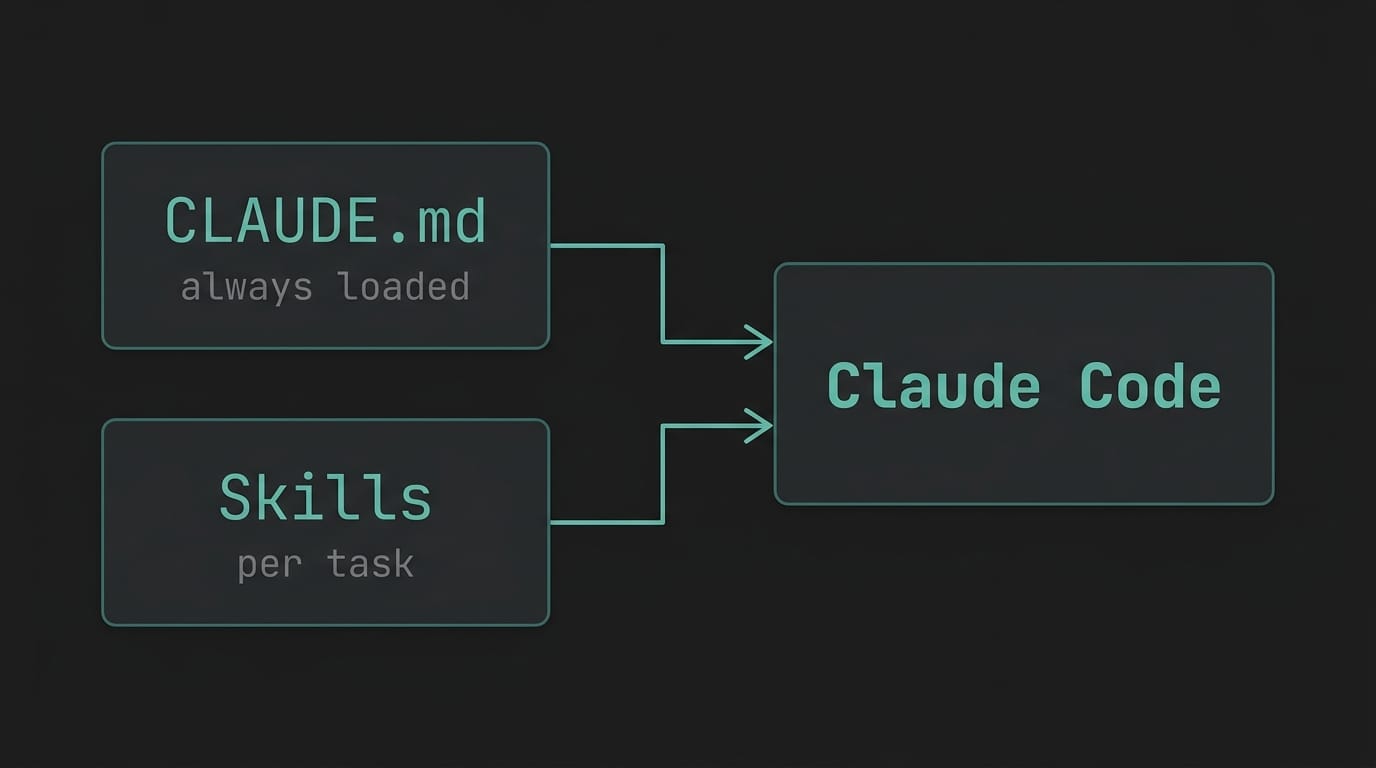
Two layers: CLAUDE.md and Skills
Claude Code supports two types of instruction files:
CLAUDE.md lives in the root of your project. Claude Code reads it automatically at the start of every session. Think of it as your onboarding document for the AI — project structure, conventions, critical rules, things that should never happen.
Skills (.claude/skills/*.md) are task-specific workflows. They're not loaded automatically — Claude Code picks them up when the task matches the skill's description. Each skill is a step-by-step protocol for a specific job: create a test, fix a failing test, write a POM class.
CLAUDE.md defines what your project is and what the rules are. Skills define how to execute specific tasks.
Together, they turn a capable but directionless AI into something that actually behaves like a senior engineer on your team.
My CLAUDE.md — the key sections
I won't paste the whole file (link to the GitHub repo below), but here are the sections that actually changed how Claude Code behaves.
Authentication rules
My project uses Playwright's storageState to handle auth — the setup project runs once, saves session cookies to disk, and every test picks them up automatically.
Without explicit instruction, Claude Code would add login calls inside individual tests. That breaks the entire auth model. So my CLAUDE.md has a critical rule:
DO NOT call the programmatic login helper inside individual tests. Each browser context already has the session loaded from storageState.
One rule. Saves hours of debugging auth failures that look like flakiness.
E2E writing standards — the 5-point checklist
This is the most valuable part of the file. Every test Claude Code writes must satisfy all five:
- Label visibility checks — assert every field label is visible before interacting with it
- Scoped locators — if a label appears more than once in the DOM, scope the locator to its parent container
- Store entered data — assign every value typed into a form to a variable, then reuse it for assertions
- Review page assertions — on any confirmation or summary screen, assert all stored values are displayed
- Step-by-step assertions — after each significant action, assert the expected outcome before moving on
None of these are rocket science. But without explicit instruction, Claude Code skips most of them. With them in CLAUDE.md, they show up consistently — every test, every session.
DOM recon before writing code
This one is counterintuitive. Before writing any test code, Claude Code must:
- Navigate to the target page
- Catalog all form fields, labels, roles, and parent containers
- Identify duplicate labels and plan a scoping strategy
- Map the full user flow including what appears on review screens
Then write the code.
It slows the first step down slightly. It eliminates two or three debugging cycles entirely.
My three Skills
create-e2e — test creation workflow
Five steps, in order, no skipping:
- Gather requirements — ask for the test ID and fetch acceptance criteria before writing anything
- DOM recon — inspect the live page, catalog all interactive elements, identify duplicate labels
- Write the test — using POM, with the 5-point checklist enforced
- Run and validate — run only the new test, fix failures before presenting
- Self-check — Claude reviews its own output against the checklist before showing it to me. In my experience, most people skip this step when writing skills. It catches the most issues.
fix-test-loop — autonomous debugging
This skill implements a self-healing loop:
MAX_ITERATIONS = 10

while iteration < MAX_ITERATIONS:
  1. Run the failing test
  2. If passing → done, report success
  3. If failing → diagnose root cause, apply fix, re-run only the failing test
  4. Log: which test failed, root cause, what changed
The diagnosis phase covers four failure categories: selector/locator issues, timing and race conditions, data/state problems, and environment/build issues. For each category, there's a specific investigation approach.
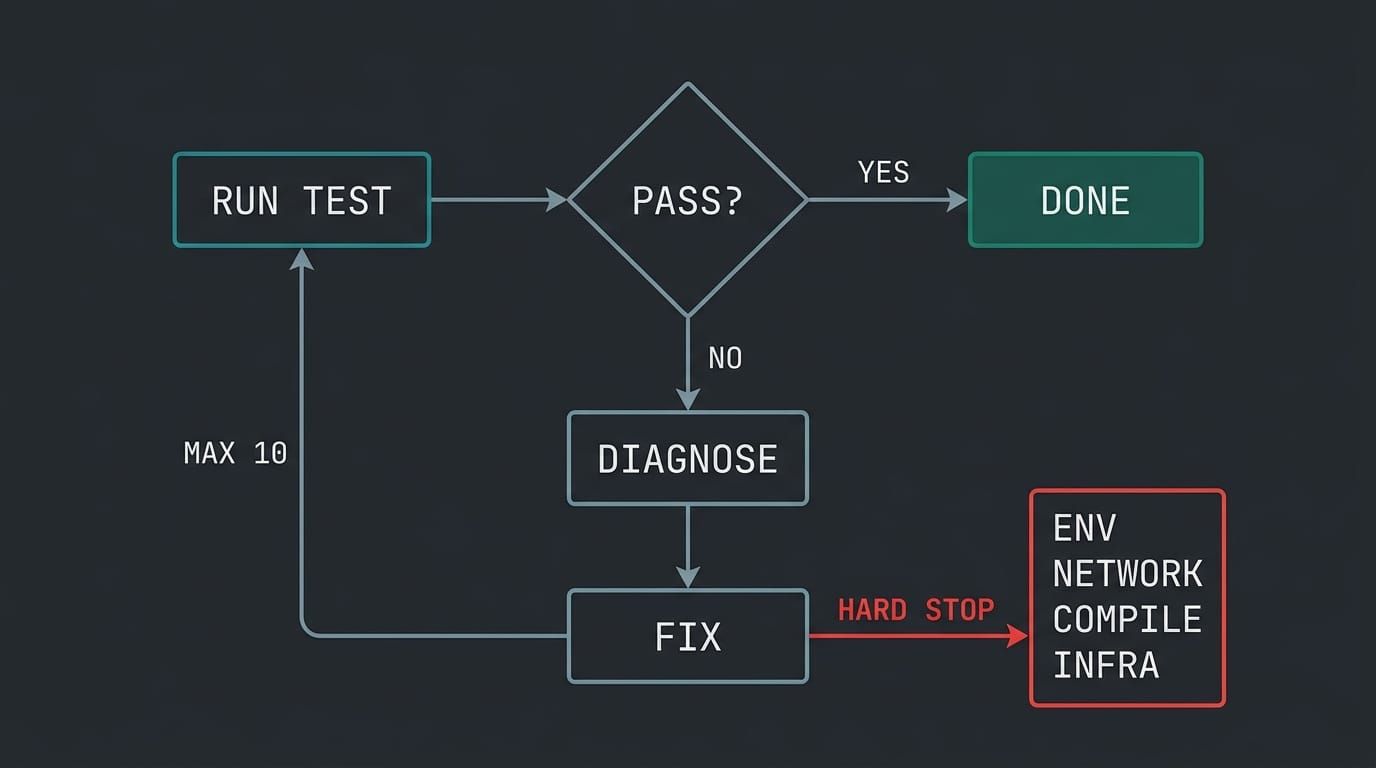
What makes this skill valuable isn't the loop — it's the hard stops. Claude Code will not retry on:
- Missing environment variables
- Network unreachable
- TypeScript compilation errors
- Test infrastructure failure
Teaching an AI agent when to stop is as important as teaching it what to do.
page-objects — POM consistency
A focused skill with one core rule: check existing POMs first, extend them, don't duplicate.
It also enforces a locator priority order:
getByRole()— semantic, always preferredgetByText()/getByLabel()locator()with CSS or XPath only as a last resort
And a class structure pattern — constructor initializes all locators as typed properties, methods are async and include their own assertions. Every POM Claude Code writes in this project follows the same shape.
Without this skill, Claude would invent a new locator for the same button in every test that touches it. Three tests, three different selectors, all fragile in different ways. This skill forces it to check whether the element already exists in a POM before creating anything new.
Before and after
Before these files existed, I spent 20 to 30 minutes per session correcting things that should have been right the first time — wrong locator strategies, missing assertions, login calls in the wrong place. Most tests needed at least two correction cycles before they were usable. Each session started from zero.
After: Claude Code opens the project, reads the context, and produces tests that match team standards without me explaining them again. Most tests pass on the first run. The fix-test-loop skill means I can hand off a failing test and come back to a green one.
The 20 minutes I used to spend correcting AI output now go into reviewing what the tests actually verify.
The template
I'm publishing a stripped, company-agnostic version of all four files as a GitHub template:
github.com/dusan011/claude-code-qa-setup
What's in the repo:
claude-code-qa-setup/
├── CLAUDE.md
├── .claude/
│   └── skills/
│       ├── create-e2e.md
│       ├── fix-test-loop.md
│       └── page-objects.md
└── README.md
Fork it, adapt it to your project, remove what doesn't apply. The structure matters more than the specific content.
If you haven't read how I used Claude Code to fix real UI bugs — that's Post #1.
One thing before you go
These files are not magic. They're instructions. Claude Code will still make mistakes — but they become fewer, more predictable, and easier to fix because the baseline is consistent.
The real shift is this: instead of prompting your way through every session, you invest once in defining your standards, and the AI applies them every time.
What does your CLAUDE.md look like? I'd genuinely like to know how other QA engineers are solving this — drop a comment or reach out on LinkedIn.
If this was useful, I publish practical posts about AI in QA workflows at dusanpetrovic.dev. No fluff, no generic AI takes — just what's actually working.
Next post: I'll walk through the create-e2e skill in action — from a real Jira ticket to a finished Playwright test, with the full Claude Code session shown. If you don't want to miss it, subscribe below.